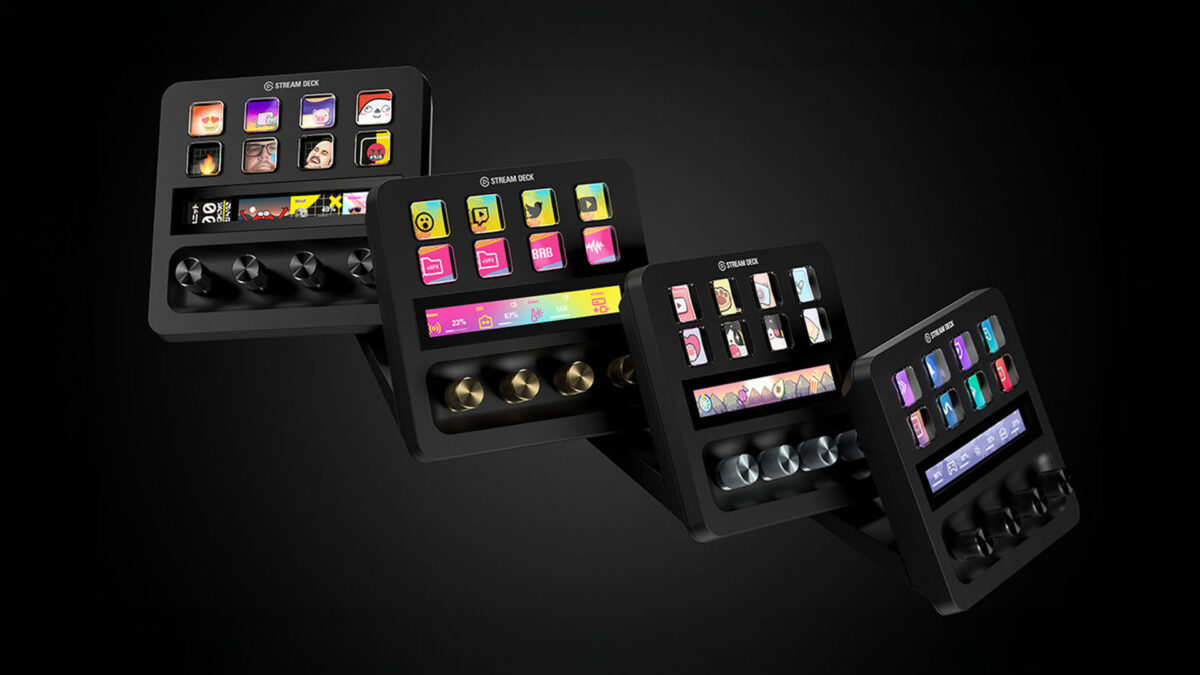
Streamline Your Church Service with Stream Decks: A Full Walkthrough for Arizona Worship Teams
Ever felt like your worship center’s tech team is juggling too many tasks during service, switching cameras, changing slides, muting mics, all while trying to stay in the flow of worship? At Brilliance AV, we’ve seen how a simple Stream Deck can turn chaos into calm in Phoenix Valley churches. It’s like giving your volunteers a magic remote that puts every action one button away. Here’s a practical walkthrough on using Stream Decks to streamline services in Arizona worship centers, with Brilliance AV as your church AV company Phoenix.
What is a Stream Deck and Why Churches Love It
A Stream Deck is a customizable button panel (from Elgato) that lets you trigger macros, shortcuts, and commands with one press. For churches, it’s a volunteer-friendly tool that simplifies complex workflows during worship, livestreaming, or special events in Mesa, Chandler, or Scottsdale worship centers.
Common uses:
- Switch camera angles
- Advance presentation slides
- Toggle livestream overlays
- Control lighting presets
- Mute/unmute mics
- Launch announcements or countdowns
It reduces stress, minimizes errors, and lets your team focus on worship instead of fumbling with keyboards or multiple apps.
Why Stream Decks Are Perfect for Arizona Churches
Arizona worship centers range from small, multi-purpose rooms to larger venues with full production. Stream Decks shine because:
- Volunteer-Friendly: Intuitive buttons replace complicated hotkeys.
- Budget-Friendly: Entry models start low, yet deliver big impact.
- Customizable: Create profiles for different services (Sunday worship, youth night, Christmas).
- Scalable: Add buttons as your AVL grows, from basic to multi-camera setups.
- Hybrid Worship Ready: Control livestream elements without leaving the console.
Step-by-Step Walkthrough: Setting Up Stream Decks for Church
Here’s how to get started and streamline your church AV setup Arizona:
Step 1: Choose the Right Stream Deck Model
- Mini (6 keys): Great for small teams, basic slide/camera switching.
- MK.2 (15 keys): Most popular for churches, balances size and functionality.
- XL (32 keys): Ideal for complex productions with multiple cameras, lighting, overlays.
For most Phoenix Valley churches, the MK.2 hits the sweet spot. Brilliance AV can help pick the model that fits your workflow.
Step 2: Install the Software and Connect
Download the free Stream Deck app (Mac/PC). Plug in via USB, and you’re ready to customize. No complicated drivers needed.
Step 3: Build Your First Profile – Sunday Worship
Create a profile named “Sunday Service” with these common buttons:
- Camera 1 (pulpit), Camera 2 (worship team), Camera 3 (wide shot)
- Next Slide / Previous Slide (ProPresenter, EasyWorship)
- Lower Thirds on/off (name, sermon title)
- Livestream Start/Stop
- Mic Mute for pastor/worship leader
- Lighting Preset (sermon mode, worship mode)
- Countdown timer trigger
Group buttons by function (cameras in one row, slides in another) for quick access.
Step 4: Add Multi-Actions for Efficiency
Create “Multi-Actions” to chain commands:
- “Sermon Mode”: Camera 1 + Lower Thirds on + Lighting warm + Mics live
- “Worship Mode”: Camera 2 + Lyrics overlay + Lighting vibrant + Band mics up
This turns five steps into one button press.
Step 5: Integrate with Your Church Software
Stream Deck works natively with:
- ProPresenter (slide control)
- OBS Studio (livestream scenes, overlays)
- vMix (switching, graphics)
- Lightkey or other lighting software (presets)
- Zoom or Restream (broadcast controls)
Brilliance AV can set up integrations for church livestream Arizona and presentation tools.
Step 6: Train Your Volunteers
Hold a 30-minute session showing how to switch profiles (Sunday vs. Youth vs. Special Event). Use the Stream Deck’s folder feature to organize complex setups. Create a one-page cheat sheet for each profile.
Step 7: Test and Refine
Run a full rehearsal with the team. Note any missing buttons, then add them. Test livestream output to ensure smooth transitions. Brilliance AV offers training and rehearsal support for volunteer-friendly AVL solutions.
Maintenance and Long-Term Tips
- Keep firmware updated for new features.
- Use protective covers to prevent dust in Arizona’s dry climate.
- Create backup profiles on a second device.
- Schedule quarterly reviews to add new shortcuts as your ministry grows.
Brilliance AV’s AVL Maintenance Packages include Stream Deck optimization and ongoing support.
Brilliance AV: Your Arizona Stream Deck Partner
Stream Decks simplify worship production, letting your team focus on ministry instead of tech stress. At Brilliance AV, we’re passionate about helping Phoenix Valley churches, from Gilbert to Glendale, streamline church AV setup Arizona with tools like Stream Decks. From setup, integration to training, maintenance with our AVL Maintenance Packages, we’re your church AV company Phoenix. Ready to simplify your service with Stream Decks for church? Contact Brilliance AV today, let’s make your worship flow effortlessly!
Keywords: church stream deck Arizona, church livestream Arizona, worship production Arizona, church AV company Phoenix, church AV setup Arizona, volunteer-friendly AVL solutions, church video system Arizona, Stream Deck for church worship, church media ministry Arizona, affordable church AVL Arizona, church AVL upgrades Arizona, church livestream solutions Arizona
Let's build irresistible experiences.
Connect With Us
Planning a project? Share your vision with us through this form, and we'll connect with you shortly.
Portable PA Systems for Small Churches and Church Plants: What You Actually Need
Church Presentation Software: ProPresenter and the Alternatives, Compared
How to Light a Worship Stage: A Beginner’s Guide for Phoenix Churches
How Much Internet Speed Does Your Church Need to Live Stream?
Does Your Church Need an Assistive Listening System? ADA and Hearing Help, Explained
How to Stop Microphone Feedback in Your Church Before It Ruins the Service
Can My Church Legally Stream Worship Songs? CCLI and Streaming Licenses, Explained
Does Your Church Production Team Need a Headset Intercom System?